Gameplay / Rules / Tips
How to Play Klondike Solitaire
New to Solitaire, or trying to win more often? This guide explains the familiar Windows-style Klondike layout, legal moves and practical decisions that can improve a hand.
1. Understanding the Game Board
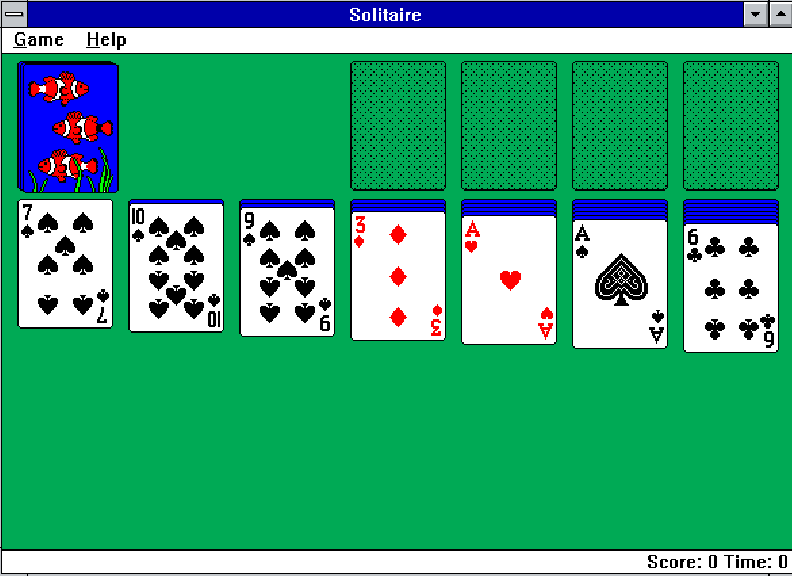
A Klondike game begins with seven tableau columns. The first column has one card, the second has two, and so on until the seventh has seven. Only each column's top card begins face up. The undealt cards form the stock.
Illustration only; the actual cards and layout change each deal.
- Tableau: Seven columns where you uncover and rearrange cards.
- Stock: The remaining face-down deck you draw from.
- Waste: The face-up cards drawn from the stock.
- Foundations: Four piles, one for each suit, built Ace through King.
2. The Moves You Can Make
Move cards on the tableau
Place a face-up card on another card of the opposite color and exactly one rank higher: for example, a red 7 on a black 8. You can move an entire valid descending sequence together.
Flip exposed cards
When you clear the face-up cards from a column, turn its newly exposed face-down card over. Uncovering cards gives you more options.
Use empty columns for Kings
An empty tableau column can only receive a King or a correctly ordered sequence beginning with a King.
Build the foundations
Start each foundation with an Ace, then add 2, 3, 4 and so on in the same suit until the King. You win once all 52 cards are in the four foundations.
Draw from the stock
If no useful move is available on the tableau, draw from the stock. Traditional Klondike has draw-one and draw-three options, and different editions may restrict how often you can recycle the waste pile. Use the options shown by the version you're playing; this guide does not assume a particular stock-redeal setting.
3. Mouse Controls
- Click the stock to turn over a card.
- Click and drag a face-up card or valid stack onto a legal destination.
- Release to place the card. Illegal moves return the cards to their previous position.
- Some Solitaire editions support double-click to move a card to its foundation automatically. Try it only if your current game supports it.
On SolitaireExe.com, the emulator is desktop-first. Mobile visitors are offered a touch-friendly alternative.
4. A Useful First-Move Checklist
- Look for any Aces that can start a foundation.
- Compare your available tableau moves and choose those that uncover face-down cards.
- Check whether moving a King into an empty column will expose more cards.
- Consider whether a low card is more valuable on the tableau than on a foundation right now.
- Only then turn to the stock for another option.
5. Strategy That Actually Helps
>> PRIORITIZE INFORMATION
Moves that reveal hidden cards often improve your future choices.
>> MANAGE EMPTY SPACES
Creating an empty column is helpful when you can fill it with a productive King-led sequence.
>> KEEP BOTH COLORS WORKING
If all your available moves depend on one color, consider preserving cards that allow other sequences.
>> DON'T AUTOPILOT FOUNDATIONS
Moving every playable card upward immediately can block the tableau. Consider what you'll need next.
>> ACCEPT SOME UNWINNABLE DEALS
Not every Klondike deal can be won. Making sound decisions matters more than forcing every game.
6. Common Questions
Can any card go into an empty column?
No. Only a King, or a sequence headed by a King, may enter an empty tableau column.
Do foundation cards have to alternate colors?
No. Foundations are built by suit in ascending order. Alternating colors applies to descending tableau moves.
Do I have to move all 52 cards to win?
Yes. All four foundations must be complete, Ace through King.
Is Draw Three harder?
Draw Three generally restricts access to stock cards compared with Draw One, though actual difficulty also depends on redeal rules.
Curious why this simple game became a Windows icon? Read the history of Windows Solitaire.